
Table of Contents
Use AI to summarize this article
What can you actually do with it?
The Webflow MCP Bridge app lets you connect your Webflow project directly to Claude and perform real actions from your chat window with no Designer required. Here's what's now possible
Site audit
Catch broken links, missing alt text, and incomplete meta descriptions automatically
Build sections
Describe a layout and Claude creates responsive sections based on your existing design system
Generate copy
Write and update page copy, including headlines, CTAs, and descriptions without opening the editor
Translate at scale
Push translations across your entire site from a single prompt
Update CMS items
Manage and update your CMS collections directly through conversation
Work from mobile
Manage your Webflow site through prompts, even from your phone
How to connect Claude to Webflow
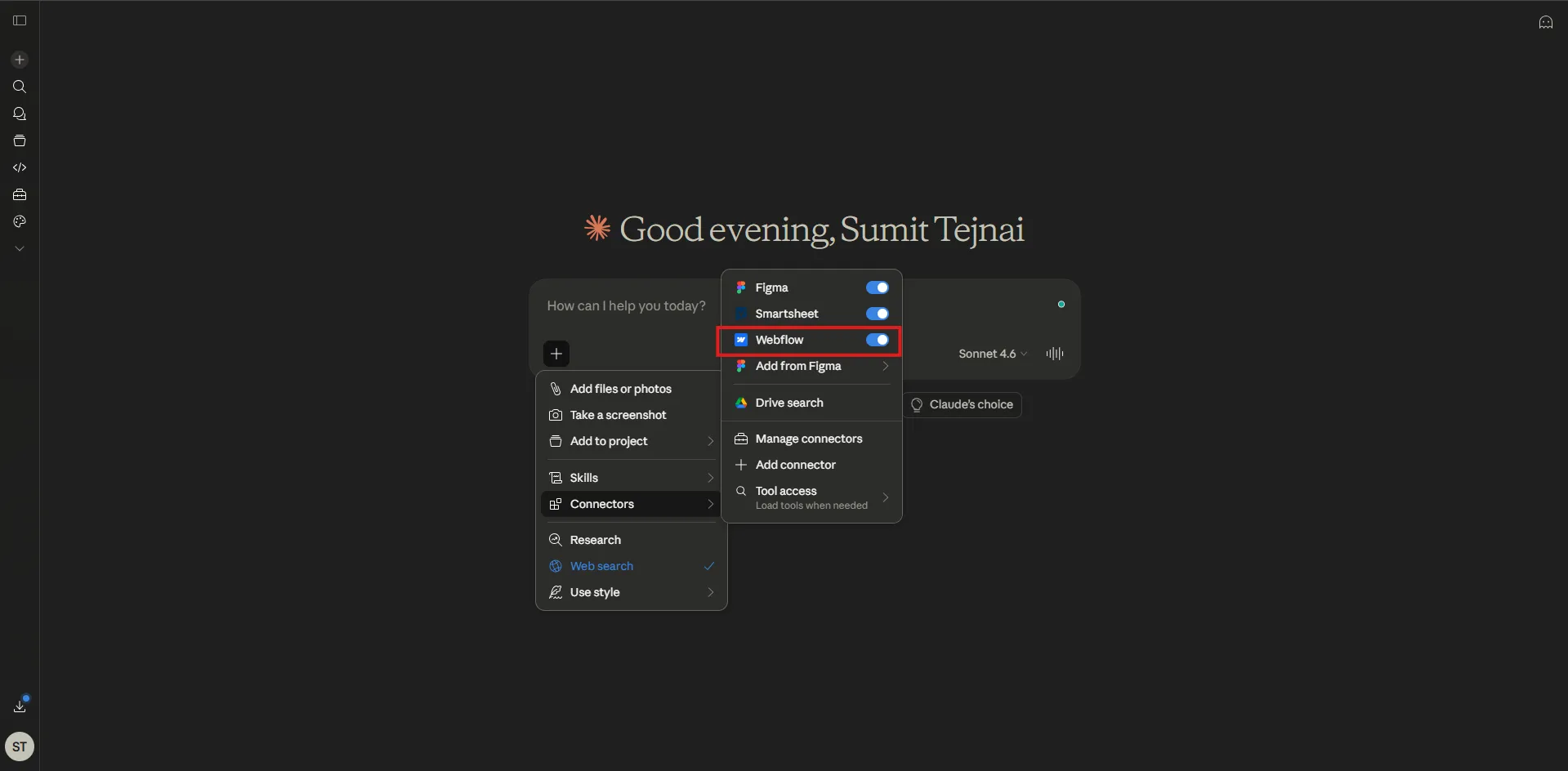
The setup takes under 5 minutes. Here's the complete walkthrough
1. Add the Webflow connector in Claude
In the Claude chat window, click the plus icon, then click Add connectors. Search for the Webflow connector and click Connect
2. Authorize access to your Webflow account
Claude will prompt you to log in to Webflow in a new tab. Grant the required permissions and select which sites and Workspaces you want to give Claude access to
3. The app is automatically installed
Once authorized, the Webflow MCP Bridge app is installed in your workspace automatically. No manual installation, and it's not on the public marketplace
4. Open the MCP Bridge app in the Designer
Open the Apps panel in the Designer using shortcut E, launch Webflow MCP Bridge, and wait for it to connect to the MCP server. Claude now has full access
5. Write your first prompt
You're connected. Start building. Here's a prompt to try first
Example prompt
Create a responsive hero section with a title, a description, and a CTA button based on the existing design system and design
Limitations to keep in mind
Webflow is making strong progress, but some structural constraints still exist in the current version of the MCP Bridge app
Development speed is slower compared to vibe coding platforms like Lovable or Claude Code. The MCP Bridge app must stay open in the Designer for the connection to remain active. Some complex actions are still beyond what the integration supports today. Output quality depends heavily on how precise and well-structured your prompts are.
Heads up for large sites. On sites with an established design system, a poorly worded prompt can cause Claude to modify existing classes or values and create conflicts at scale. Prompt carefully and be specific
Our take
Webflow is moving in the right direction. By reducing the complexity of integrating AI tools into the platform, it's opening the door to a genuinely agentic web design workflow. The MCP Bridge app still has some structural constraints, but it already unlocks powerful use cases and signals a clear shift toward an AI-first platform
For teams already working in Webflow, the barrier to getting Claude into your workflow has never been lower. Five minutes from now, your site could be manageable through a chat window.
FAQs


.png)
.png)